
Your Nespresso is blinking orange and won’t brew — and before you panic, here’s the good news: a Nespresso orange light almost never means your machine is broken. It’s a built-in alert system, and every blink pattern has a specific meaning with a specific fix.
This guide covers every orange light pattern for the Vertuo Next and VertuoPlus. Use the quick-reference table below to find your pattern, then jump to the step-by-step fix.
Nespresso Orange Light — Quick Reference Table
Find your model and blink pattern in the table below, then scroll to the matching section for the full fix.
| Model | Light Pattern | Meaning | Fix |
|---|---|---|---|
| Vertuo Next | Blinks 2x per second | Time to clean | Run cleaning cycle |
| Vertuo Next | Blinks 3x per second | Descale required | Run descale cycle |
| Vertuo Next | Pulses on/off slowly | Machine overheating | Turn off 20 mins |
| Vertuo Next | Blinks rapidly 2x then off | General error | Check pod, lock, water tank |
| Vertuo Next | Blinks on/off, won’t start | Empty water tank or unlocked head | Refill tank or lock head |
| Vertuo Next | Blinks 5x in 10 seconds | Factory reset needed | Press button 5x in 3 seconds |
| Vertuo Next | Orange + white alternating | Descale reminder | Schedule descaling soon |
| VertuoPlus | Steady orange | Special function mode active | Select function within 2 mins |
| VertuoPlus | Half red / half green | Descale alert | Run descale cycle |
| VertuoPlus | Blinks 2x every 2 seconds | Emptying system mode | Complete empty system process |
| VertuoPlus | Blinks 3x | Factory reset needed | Use special function menu |
Nespresso Blinking Orange After Descaling
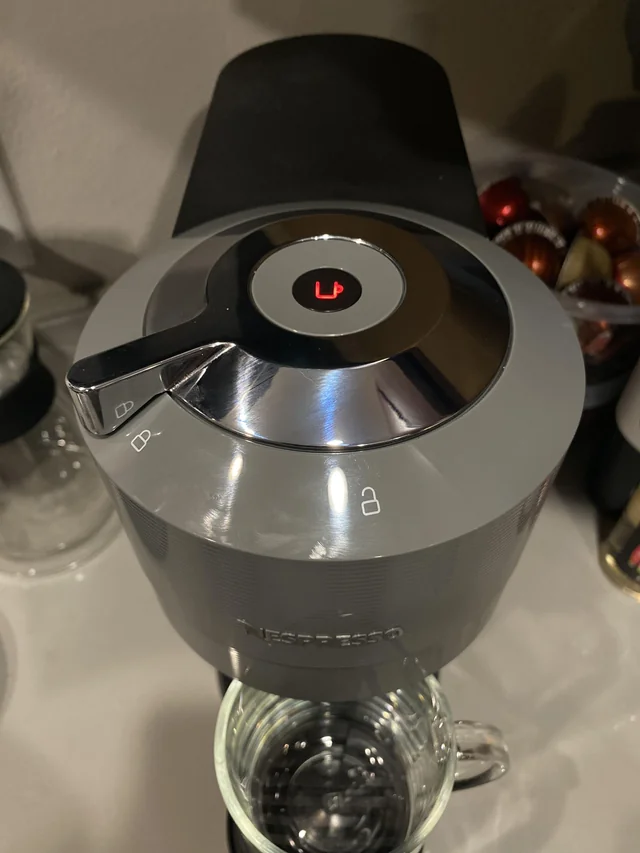
This is the most common orange light issue across all Nespresso models, so it’s worth covering first. If your Nespresso machine is flashing orange after descaling, it almost always means one of two things:
- You only completed Step 1 of the descale process (the solution rinse) but skipped Step 2 (the water rinse)
- You didn’t exit descale mode correctly after the process finished
The fix: Refill the water tank with fresh water and run the rinse cycle again. If the orange light persists, check my full guide on Nespresso Stuck in Descaling Mode for model-specific exit steps.
Nespresso Vertuo Next Blinking Orange — Every Pattern Explained

The Vertuo Next uses orange and white light combinations to communicate different states. Here’s what each pattern means and exactly how to fix it.
Vertuo Next Orange Light Blinking 2 Times Per Second — Time to Clean
Two blinks per second means your machine is prompting you to run a cleaning cycle. This is a quick rinse — not a full descale — and it flushes out coffee residue from inside the machine. You should run it every week or two depending on how often you brew.
How to Start Cleaning Mode on Nespresso Vertuo Next
Before you start: Empty the drip tray, capsule container, and fill the water tank to the MAX line with water only — no cleaning solution.
- Let it run the full cycle for best results. You can stop it by pressing the button, but a complete cycle is recommended.
- Open the machine head and make sure no pod is inside. Close and lock it.
- Wait until the light turns steady white — this means the machine is ready.
- Press the button three times within 2 seconds. The light will turn blinking orange, confirming cleaning mode has started.
- The process takes about 2 minutes to begin, then water flows for approximately 5 minutes.
- Let it run the full cycle for best results. You can stop it by pressing the button, but a complete cycle is recommended.
Vertuo Next Orange Light Blinking 3 Times Per Second — Descale Required
Three blinks per second is your descale alert. Unlike cleaning, descaling uses a special solution to dissolve calcium deposits inside the machine. You should descale every 3–6 months depending on your water hardness and usage.
Important: The Vertuo Next descale process cannot be interrupted once started. Only begin if you have 20 uninterrupted minutes.
Step 1 — Descale with Solution
- Lock the lever and press the button to begin. Water will run until Phase 1 completes automatically.
- Empty the drip tray and capsule container. Remove any pods.
- Pour one Nespresso descaling sachet into the water tank, then add 17 oz (500ml) of water.
- Start the machine and wait for steady white light.
- Open the head, confirm no pod is inside, close it and leave the lever in the UNLOCKED position.
- Press and hold the button for 7 seconds. The light will start flashing orange rapidly.
- Within 45 seconds: lock the lever, unlock it, then hold the button for 7 more seconds.
- Lock the lever and press the button to begin. Water will run until Phase 1 completes automatically.
Step 2 — Rinse
- Remove the water tank, rinse it thoroughly, and refill with fresh drinking water.
- Press the button. The machine will rinse and stop automatically when done.
- The blinking orange light will stop and the machine will return to steady white — descaling is complete.
Vertuo Next Orange Light Pulsing On and Off — Machine Overheating
A slow pulsing orange light (fading in and out) means your machine has overheated. This usually happens after brewing several cups in quick succession. The fix is simple: turn the machine off and leave it to cool for at least 20 minutes before brewing again.
Vertuo Next Orange Light Blinks Rapidly Twice Then Turns Off — General Error
This is a general error signal. It typically means something isn’t set up correctly. Check the following:
- Is the pod inserted correctly, or is there a stuck pod blocking the brew head?
- Is the machine head locked in the correct position?
- Is the water tank properly seated and filled?
If you’re trying to clean or descale and get this error: make sure no pod is in the machine and the lever is properly locked.
If none of the above fixes it, unplug the machine for a few minutes and try again.
Vertuo Next Orange Light Blinking On and Off, Won’t Brew — Empty Tank or Unlocked Head
If the Nespresso machine is flashing orange and won’t start brewing, check two things first: the water tank (refill if empty) and the brew head (make sure it’s fully locked). Either one being off will prevent brewing.
Vertuo Next Orange Light Blinking 5 Times — Factory Reset Required
Five blinks in 10 seconds is your machine’s way of requesting a factory reset. Note: this will erase any custom cup size settings you’ve programmed.
How to Factory Reset Nespresso Vertuo Next
- Open the head and eject any pod inside.
- Close the head and leave the lever in the UNLOCKED position.
- Press the button five times within 3 seconds. The light will blink orange five times, then turn steady white — reset complete.
Nespresso VertuoPlus Blinking Orange — Every Pattern Explained

The VertuoPlus uses a different signalling system to the Vertuo Next. Here, orange lights mean you’re in a special function mode, while red lights signal an actual error or problem. Understanding this distinction avoids a lot of confusion.
VertuoPlus Steady Orange Light — Special Function Mode
A steady (non-blinking) orange light means Special Function mode is active. This is the gateway to descaling, emptying the system, and factory reset on the VertuoPlus — you access all maintenance functions through this mode.
How to Enter Special Function Mode
Press the button and lever down together for 3 seconds. Steady orange light confirms you’re in the menu. You have 2 minutes to make a selection.
Function menu options: Once in Special Function mode, use the lever to select:
- Press lever down three times → Factory Reset
- Press lever down once → Descale Mode
- Press lever down twice → Empty System Mode
To exit Special Function mode: Press the button and lever together for 3 seconds again. Steady green light means you’re back to normal.
VertuoPlus Half Red / Half Green Light — Descale Alert
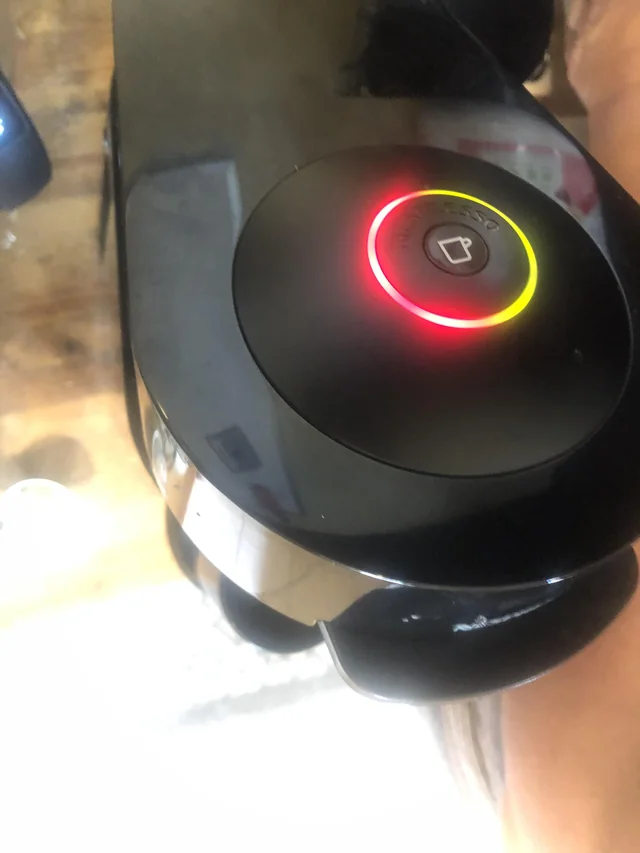
A half-red, half-green light on startup is the VertuoPlus descale reminder. You can still brew for a while, but the longer you delay descaling, the more it can affect coffee temperature and taste.
Step 1 — Descale
- Let water run through completely — Phase 1 is done when it stops automatically.
- Turn machine on, open head to confirm no pod inside, close it.
- Turn off by holding the lever down for 3 seconds.
- Add one descaling sachet and 17 oz (500ml) of water to the tank.
- Enter Special Function mode: press button + lever together for 3 seconds until steady orange.
- Press lever down once to select Descale Mode, then push button to start.
Step 2 — Rinse
- The orange light will blink every 2 seconds when the rinse is complete.
- Wash the water tank and refill with fresh water.
- Press the button — the machine will rinse and stop automatically.
Exiting Descale Mode on VertuoPlus
Important: The VertuoPlus does NOT exit descale mode automatically. You must manually exit by pressing the button and lever together for 3 seconds. Steady green light confirms you’re done. If you skip this step, your machine will keep blinking orange even though descaling is finished.
VertuoPlus Orange Light Blinks Twice Every 2 Seconds — Empty System Mode
This pattern indicates Empty System mode is active. You’d use this before long periods of storage or before sending the machine for repair.
- Empty the water tank fully, then replace it.
- Open head to remove any pod, then close.
- Turn off by holding lever down for 3 seconds.
- Enter Special Function mode (button + lever for 3 seconds).
- Press lever down twice to select Empty System, then press button to start.
- Place a container under the spout. Let it run until the machine turns off automatically.
VertuoPlus Orange Light Blinks 3 Times — Factory Reset
Three blinks on the VertuoPlus means a factory reset is needed. This clears all programmed volumes and returns the machine to its out-of-box settings.
- Turn off the machine (lever down for 3 seconds).
- Enter Special Function mode (button + lever for 3 seconds). Steady orange appears.
- Press the lever down three times, then push the button to confirm.
- Orange light will blink 3 times, then turn steady green — reset complete.
How to Clean the VertuoPlus (Cleaning Mode)
Run this weekly or every two weeks to keep your machine performing at its best. It takes about 7 minutes total.
- Rinse the water tank and fill with fresh water. Rinse drip tray and capsule container too.
- Place a container (minimum 27 oz / 800ml) under the spout.
- Enter cleaning mode: open the head (no pod inside), close it, then press the button three times within 2 seconds.
- Orange light blinks for 2 minutes before water starts flowing — let it run.
- Water pumps in three intervals. Cleaning is complete when the light turns steady green.
Still Blinking Orange? Common Issues and Fixes
Nespresso Blinking Orange After Descaling — Detailed Fix
If your Nespresso machine is flashing orange after descaling, the most likely cause is that you only completed Phase 1. Descaling has two phases: the solution rinse and the water rinse. If you stopped after the solution phase, refill with fresh water and run Phase 2.
If you completed both phases but it’s still blinking: on the Vertuo Next, the light should stop automatically. On the VertuoPlus, you must manually exit descale mode by pressing button + lever for 3 seconds.
VertuoPlus Blinks Red and Brew Head Stops Moving
Usually caused by an obstruction — either a stuck or misaligned pod, or a full capsule container. Open the head, remove and re-insert the pod correctly, and empty the capsule container if it’s full.
Can I Keep Using My Nespresso When the Orange Light Is On?
If it’s a descale reminder (orange + white alternating on Vertuo Next, or half red/half green on VertuoPlus), yes — you can keep brewing for a while. But don’t put it off indefinitely. Calcium buildup affects water temperature, brew quality, and can eventually damage internal components.
Why Is There Coffee Grounds in My Cup?
Coffee grounds in the cup usually mean it’s time for a cleaning cycle. If there’s no descale alert but this keeps happening, run the cleaning process and see if it resolves.
Frequently Asked Questions
If you’re still running into issues of flashing orange lights, blinking red light or other issues.. keep reading to find your answer
Why is my Nespresso blinking orange and not brewing?
The most common causes are: an empty water tank, an unlocked brew head, or a pod that’s not seated correctly. Check all three first. If the machine just finished descaling, you may also need to exit descale mode manually (VertuoPlus) or complete the rinse phase (Vertuo Next).
What does the Nespresso orange light mean after descaling?
It means you haven’t fully completed or exited the descale process. On the Vertuo Next, make sure you ran both the solution rinse and the water rinse — it exits automatically after both. On the VertuoPlus, you need to manually exit by pressing the button and lever together for 3 seconds.
How do I get my Nespresso to stop blinking orange?
It depends on the blink pattern. Quick reference: 2 blinks/sec = run cleaning mode. 3 blinks/sec = run descale. 5 blinks = factory reset. Steady orange (VertuoPlus only) = you’re in Special Function mode, either select a function or exit. After descaling, exit descale mode manually on the VertuoPlus.
Does a factory reset fix the orange blinking light?
Only if the machine is prompting you for a factory reset (5 blinks on Vertuo Next, or 3 blinks on VertuoPlus). A factory reset won’t fix issues caused by a dirty machine, empty tank, or incomplete descaling — those need their specific fixes.
What’s the difference between the Vertuo Next and VertuoPlus orange light signals?
They use different systems. The Vertuo Next blinks orange at different speeds to signal different issues. The VertuoPlus uses steady orange to indicate Special Function mode is active (not an error), and uses red lights for actual errors. When in doubt, check the blink pattern in the quick-reference table at the top of this guide.